Examples library
Interactive feature announcement
Show how your new feature works instead of just telling users about it.
This example showcases a new feature announcement built with @flows/react that gives users an interactive preview of how the feature works.
Interactive feature announcements are a great way to introduce new features to users and help them understand how they work. Instead of just telling users about a new feature, you can show them how it works in an interactive way.
Features
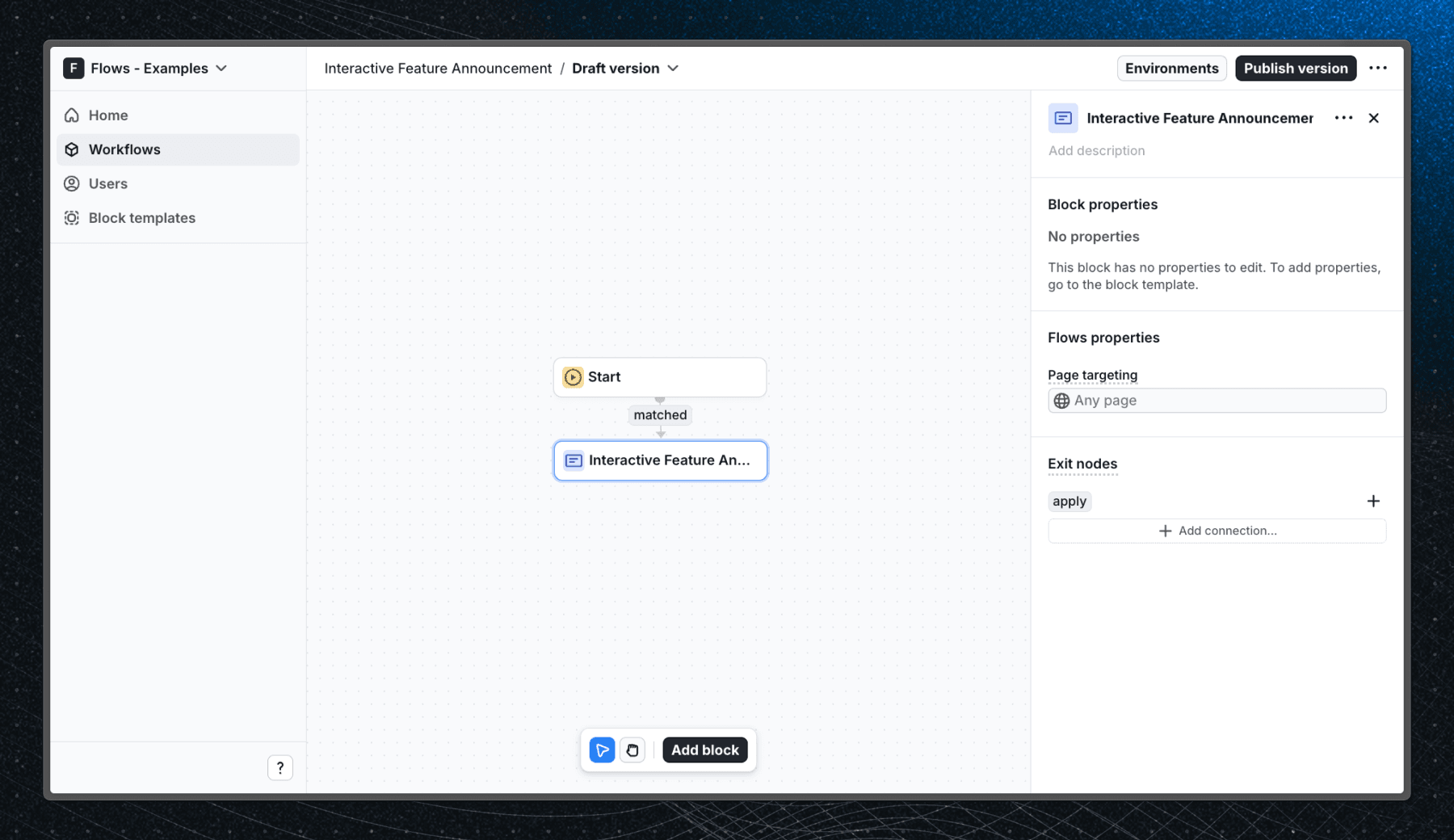
When a user enters the Interactive Feature Announcement block in a workflow, an announcement modal appears. In this example, the modal is a custom UI component announcing the release of dark mode support in the app. The modal gives users the option to select which theme they want to use (light, dark, or system default).
Below is a screenshot of how the workflow is set up in Flows:
Getting started
- Sign up for Flows if you haven’t already. You can create a free account here.
- Clone the repository from GitHub and install the required dependencies in the project directory.
- Add your organization ID in the providers.tsx file.
- Create a new component in your organization with the following configuration:
- UI component: AnnouncementModal
- No other configuration is required for this example.
- Recreate the workflow in your organization and publish it.
- Run the development server with pnpm dev.
Learn more
To learn more about Flows take a look at the following resources:
Explore more examples


Build anything with Flows
Build the product adoption experiences you've always wanted.